gpu-video v0.5.0: near-native speeds, macOS support
Release notes for gpu-video v0.5.0, together with an explanation of how the progress was achieved in various areas and our future plans.
10 Nov 2026 · gpu-video · Release notes ·

If you don’t know what gpu-video is, I wrote this short explanation recently with the express purpose of linking it near the top of posts like this one.
First of all, sorry for not sharing anything for so long. The previous release was terribly long ago. The nice thing about this is that we have a lot to talk about today, and it will hopefully be interesting. I’m very excited about all of the improvements being released, and even more excited about explaining how things work. I’m not a huge fan of dry release notes that just list new features and sometimes give new code examples. I’d like for this post to be more of a collection of explanations of what we did to achieve these results. I hope this form will be entertaining for a software engineer to read, especially if they’re not super familiar with the domain. If you prefer to just get a summary of what changed, check out the changelog here. There are three main things I’d like to talk about:
- Speed improvements on Vulkan Video targets,
- API changes,
- VideoToolbox support (which is an apple API for video stuff).
All of them, but especially the first two, are somewhat connected.
Speed improvements
Performance is a nice starting point, since it is the most important thing overall for a library like this. Nobody would want to use a hardware decoding library that just plain performs badly. I’m very pleased to report that we have achieved between 68% and 164% speed improvement on decoding, and between 13% and 69% improvement on encoding, depending on the card-scenario combination. This makes us reach speeds in the same ballpark as APIs provided by GPU vendors. How did we get here? How do you make a hardware video encoding library faster?
In order to learn that, we first have to understand how the Vulkan execution model works. In the context of gpu-video, you submit work to the GPU in batches of individual operations. These operations are things like copying a part of an image, or taking an image as the next frame of a video and compressing it. This sounds like something you would expect out of an API for a peripheral device: record a series of commands and tell the peripheral to execute them. The interesting part is that you need to explicitly order the operations that touch the same memory. The typical single-frame encoding job that a user may want to do is roughly:
- copy a buffer that contains raw frame bytes into a GPU-based image
- encode that image
And there is a memory dependency between these two! You have to explicitly tell the GPU that it has to wait to start encoding until the copy operation is done writing to the image, or else a race can happen and your output will be garbage. The default in Vulkan is to run all independent operations simultaneously. There is another hidden dependency in an encoding workflow: video compression is so efficient because later frames are often very similar to earlier ones. The encoding process of a frame uses previous frames as references. Therefore, we need to also tell the GPU that it needs to wait for the previous frame to be done before starting the next one.
Now that we know all of this, we’re ready for a diagram showing how encoding synchronization looked in the previous gpu-video release.
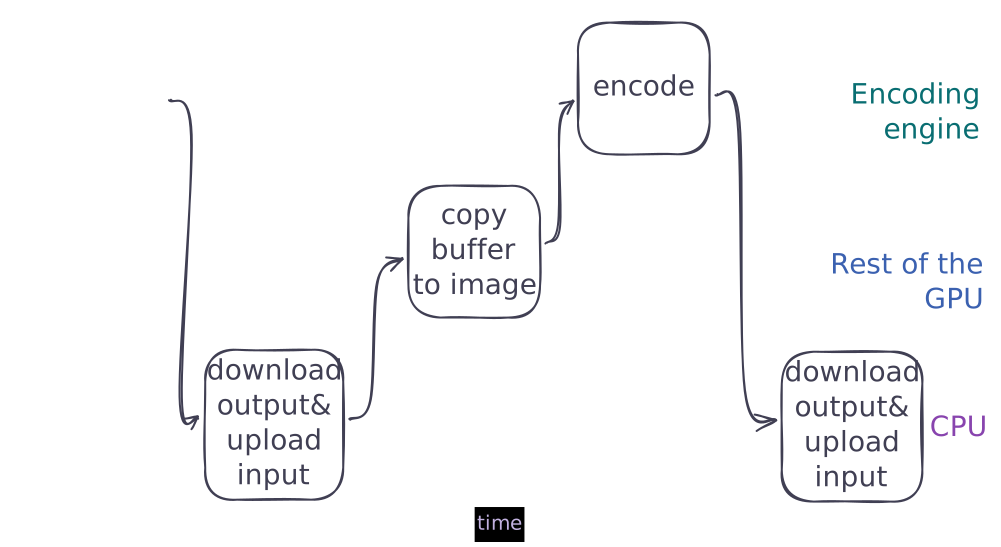
The arrows on the diagram represent the aforementioned memory dependencies. It basically showcases what I described before. This is a synchronization pattern that works for the encoder. It is not very fast, for two main reasons. First, if you look at the top row, you can see a lot of empty space. That means that, for the majority of the time, the encoding engine is idle. If we want to go as fast as possible, we should obviously utilize 100% of it, or as close to it as we can get. The other problem is harder to spot on this simplified diagram. The thread submitting a job blocks until the job is finished, and only submits the next job after that. The cost of synchronization between the CPU and the GPU is also non-negligible.
Blocking until the GPU job completes was a deliberate decision. It made the initial phases of development much easier. But we’re mostly past the early stages, definitely mature enough to stop blocking here. That change needs a new API, since we can’t just return the result from the encode() function. We settled on delivering the results through a callback, a bit like notify does. Making the API asynchronous in this way allows us to submit multiple batches while the GPU is working, so it always has something to do after it’s done with a job. After this first change, the sync diagram looks like this:
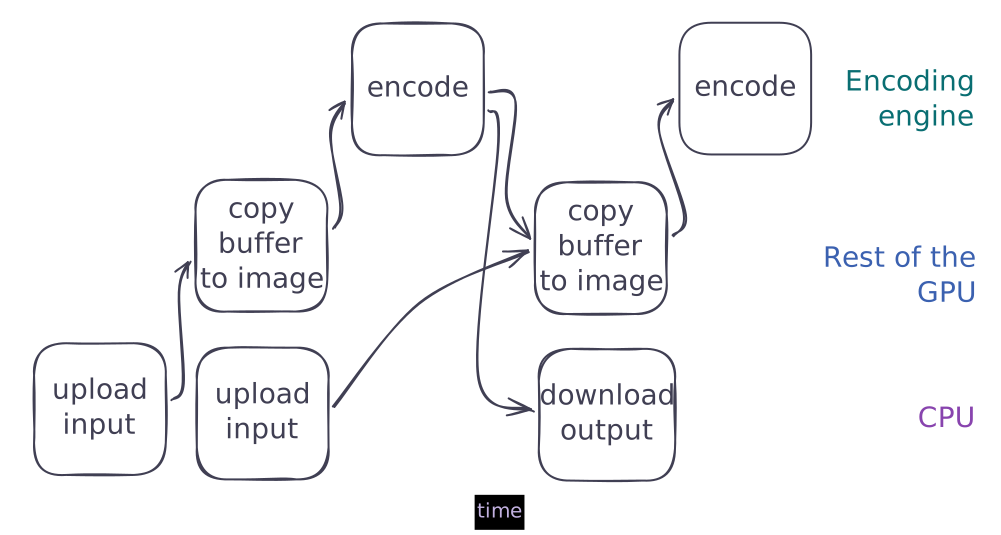
As you can see, we submit two jobs immediately, and only add more once one finishes. The GPU no longer waits for the CPU to submit more jobs. We still interleave the input copies with the encoding though. That is because initially we only allocated one input image for the encoder, so we were waiting until the previous frame’s encode was done with that image. We can allocate more input pictures and rotate between them to be able to run the copies at the same time as the encodes. This is what we get after that:
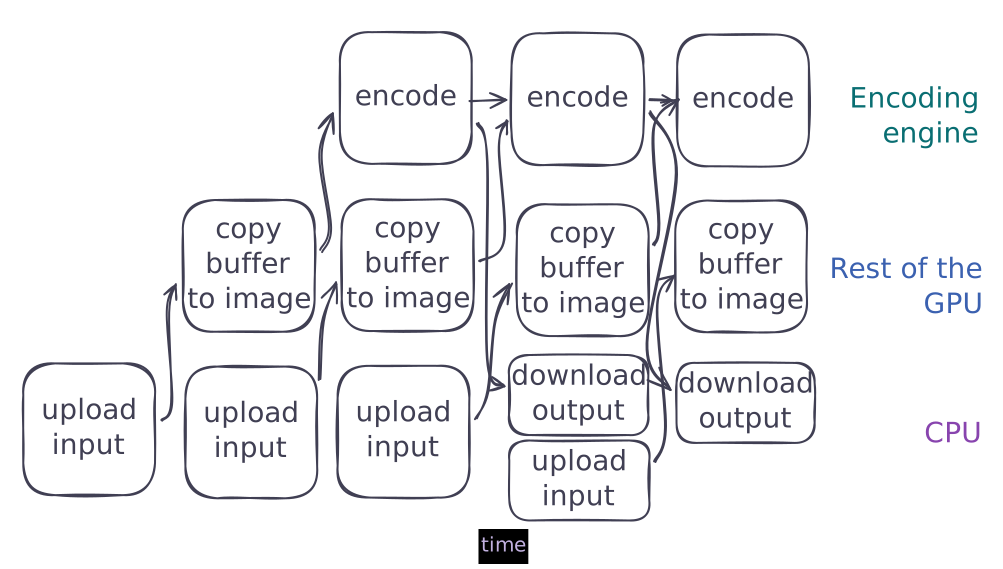
This is very nicely packed. No breaks or blocking in the encoder. We have full pipelining, like a CPU does when executing instructions. We reach about 98% hardware encoder utilization, which strongly indicates we’re squeezing all of the performance out of the GPU. That’s how we get pretty much the same results as nvenc. Notice that we need to add extra dependency edges between subsequent encode operations, so they don’t trample each other.
The decoder only got the first improvement for now, because its code is much messier than the encoder’s. I’ll talk about the refactoring plans near the end of the post.
Benchmarks
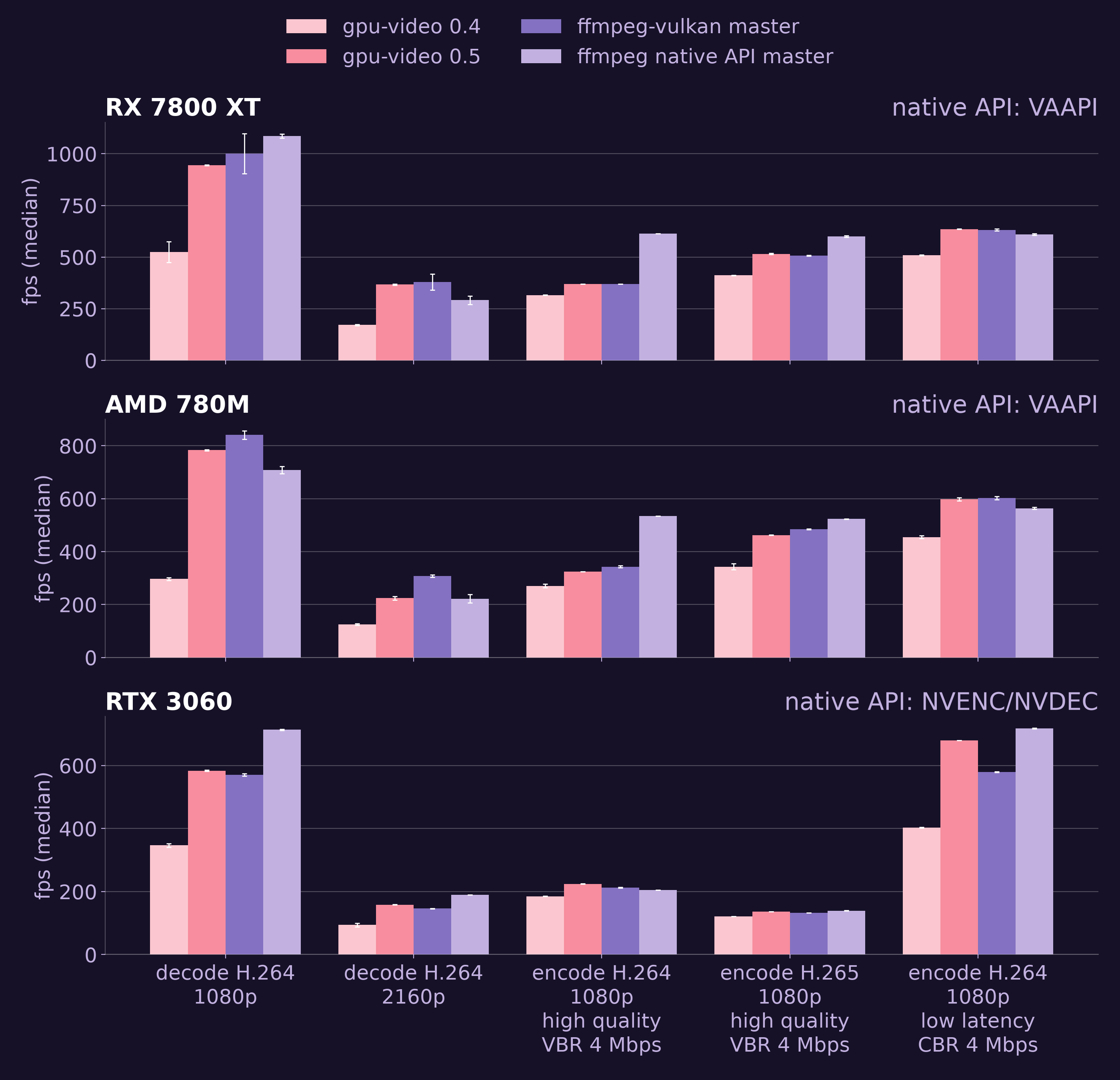
We ran each benchmark three times and picked the median result.
Notice that the only place where we are not comparable with the vendor API is high-quality encoding on AMD. FFmpeg on Vulkan Video seems to be limited in the same way as we are, so I think there is some inefficiency in the driver in that case. We will be taking a look at this, just didn’t manage to get to it in this release.
New API
I mentioned before that we had to change the API to be asynchronous. I think what we ended up with is pretty neat: the user gives us a callback that can accept a finished frame or chunk of bitstream, then we call it after every successful operation. This has the benefit of being compatible with synchronous Rust and all async runtimes. You can take a channel from your runtime of choice and send finished frames in the callback, which is nice. Implementing it required coming up with a quite fun idea which I wanted to talk about briefly.
First of all, when a user submits an encode/decode operation, we schedule it (1A on the diagram) and return to their code immediately. The callback gets called later. Something has to run it, and we no longer have the user’s thread for that. So, gpu-video spawns its own thread that waits for all operations, and as soon as one of them finishes, runs its associated callback. Of course, the thread has to be told that it should wait for an operation to finish (1B on the diagram). This gives us this communication diagram.
The thread should sleep while the tasks are running, and wake up when one of them finishes. So far, so good: there are ways to do that in Vulkan. It would look roughly like this:
// in Vulkan, GPU operations are synchronized using semaphores.// you can tell the GPU to signal a semaphore after an operation is done.// for now, let's assume we have these three semaphoreslet mut semaphores = vec![op1, op2, op3];
loop {    // of course, the real Vulkan API needs a lot more ceremony than this,    // but that's what it looks like at a high level    sleep_until_any_operations_finish(&semaphores);
    let mut unfinished_work = Vec::new();
    for semaphore in semaphores {        if semaphore.is_done() {            do_something(semaphore)        } else {            unfinished_work.push(semaphore);        }    }
    semaphores = unfinished_work;}
The problem is, how does the thread get the operations it’s supposed to wait for? On the diagram, we can see it has to wait for both a signal from the GPU and one from the user’s thread. But how do you do a poll-style operation that wakes the thread up no matter which event happens first? Our first two ideas were to:
- have a loop that checks whether either of the events happened and does a short
nanosleep,let mut semaphores = Vec::new();let receiver: std::sync::mpsc::Receiver<Semaphore> = rx;loop {while let Ok(new_sem) = receiver.try_recv() {semaphores.push(new_sem);}let mut unfinished_work = Vec::new();for semaphore in semaphores {if semaphore.is_done() {do_something(semaphore)} else {unfinished_work.push(semaphore);}}semaphores = unfinished_work;std::thread::sleep(std::time::Duration::from_millis(1)); // ugh... what number do I put here?} - or only pick up new tasks when one of the old tasks finishes.
let mut semaphores = Vec::new();let receiver: std::sync::mpsc::Receiver<Semaphore> = rx;loop {while let Ok(new_sem) = receiver.try_recv() {semaphores.push(new_sem);}sleep_until_any_operations_finish(&semaphores);let mut unfinished_work = Vec::new();for semaphore in semaphores {if semaphore.is_done() {do_something(semaphore)} else {unfinished_work.push(semaphore);}}semaphores = unfinished_work;}
Both of them have drawbacks. For the first approach, the drawbacks are obvious. Either we keep the sleep time short and use more CPU than we should, or make it long and introduce latency to the pipeline. It’s also ugly as hell.
The second approach introduces latency too, but it is a bit harder to reason about than the first one. Especially if you factor in that a single thread is used for all encoders and decoders, and that they possibly have very different processing times per frame (they can have different resolutions and different quality settings). Since there is no hard limit on how long one of these tasks can run, they can theoretically delay other tasks indefinitely.
We settled on the latter approach, implemented it, and had it pass one round of review. Only then did I realize there is a third solution we never thought of. Vulkan semaphores (the kind we use) can be signaled from the CPU. We can use a special semaphore to wake the thread up when we send it tasks. We didn’t think of it because that is a rather rare use case, at least we rarely saw it used. In hindsight, this is obviously done to facilitate this exact use case, racing a Vulkan semaphore signal against another event that happens on the CPU. The solution is simple enough then. We add an additional semaphore we can use to wake the thread up whenever we want to, and signal it by hand after putting a new task in the channel. Works like a charm.
let mut semaphores = vec![new_work_arrived_semaphore];let receiver: std::sync::mpsc::Receiver<Semaphore> = rx;
loop {    while let Ok(new_sem) = receiver.try_recv() {        semaphores.push(new_sem);    }
    sleep_until_any_operations_finish(&semaphores);    new_work_arrived_semaphore.reset();
    let mut unfinished_work = vec![new_work_arrived_semaphore];
    for semaphore in semaphores.into_iter().skip(1) {        if semaphore.is_done() {            do_something(semaphore)        } else {            unfinished_work.push(semaphore);        }    }
    semaphores = unfinished_work;}
The sender just has to signal the semaphore when it sends new work:
struct WorkSender {    sender: std::sync::mpsc::Sender<Semaphore>,    new_work_arrived_semaphore: Semaphore,}
impl WorkSender {    fn send(&mut self, new_work: Semaphore) {        self.sender.send(new_work).unwrap();        self.new_work_arrived_semaphore.signal();    }}
After writing it down, the solution seems stupidly obvious, but it wasn’t that simple to figure out, and it was very exciting when I did have that lightbulb moment.
macOS VideoToolbox support
Last but not least, VideoToolbox is officially supported, and with full feature parity. This means we can do hardware encoding and decoding on all Apple devices, seamlessly. We also integrate with wgpu, we also do zero-copy inputs and outputs from/to wgpu, it all works. We haven’t done extensive performance work yet and there are still a few wrinkles here and there, but it works!
I don’t have an interesting story about VT like I had about the previous points. There were no problems with the asynchronous API, because VT is already callback-based. We can forward the user callback to the VT API and it will get called when the job is finished.
After learning to use VT and working on the VT backend for a couple of months I can say one thing: it is the best multimedia API I have ever seen. Much nicer than GStreamer, wonderful compared to FFmpeg, just a joy to work with, honestly. I remember thinking multiple times that the API seems to have been designed after carefully considering every possible use case, not missing any, and somehow not sacrificing either performance or developer experience. Also, the objc2 libraries are very nice to work with, and block2 in particular integrates with Rust closures very naturally (for a binding to a foreign-language closure system).
Plans
New codecs
Last release, I wrote that we want to work on an AV1 encoder and an H.265 decoder next, and on Apple support in the unspecified future. This ended up not being the case at all, since we didn’t do any codecs and worked on VideoToolbox instead. This time, however, I hope it will turn out to be true. Especially AV1 encoding, as it should be relatively simple compared to adding a new decoder.
Refactoring
We came to the conclusion that the amount of technical debt we took on is getting unserviceable. The whole internal synchronization API we have on Vulkan needs to go. We already have a plan for what to replace it with, but it will still take time. On the bright side, it will make adding new decoders simpler, as one of its side effects will be the decoupling of part of the codec-generic code from the codec-specific stuff. The very short version of the refactor plan is to introduce an API for planning GPU work that is a bit similar to zig’s build script API, which would be very flexible in terms of modifying dependency edges, inputs and outputs.
New horizons
We have also been looking at Android support, since it seems unlikely we will get Vulkan Video on Android in the near future. As much as it might be bad luck for planning, I would like to work on Android in the unspecified future.
I’d also like future releases to be smaller and not take six months, but, well, I didn’t want this release to take this long either and look where that got us.
Closing remarks
Most importantly, I wanted to thank @noituri for the tireless work on this release! It feels incredible to be able to make something so cool in a two-person team.
Also, you can check out gpu-video here. Be sure to look at our examples, we’re trying to add a couple that demonstrate how to hook gpu-video up to various GUI frameworks in Rust by building mp4 players. At the time of publishing we have one built in egui, but a slint and an iced player are in the works. You can check out the parent project, Smelter, on its website and on GitHub. It is sort of like OBS, but built around a programmable interface rather than a graphical one. The easiest way to support us is to use gpu-video, to try Smelter and to talk about them with your friends.
Life advice
- do fun things. both on the computer and outside in the grass
- measure before you optimize
- have a tune